Using Windows Live Outlook Connector we can connect Windows Live Hotmail account to outlook. With Microsoft Office Outlook Connector, you can use Microsoft Office Outlook 2003 or Microsoft Office Outlook 2007 to access and manage your Microsoft Windows Live Hotmail or Microsoft Office Live Mail accounts, including e-mail messages, contacts and calendars for free!
Outlook Connector enables you to use your Live Hotmail accounts within Outlook:
- Read and send your Office Live Mail/Windows Live Hotmail e-mail messages.
- Manage your contacts in Windows Live Hotmail.
- Use advanced options for blocking junk e-mail messages.
- Manage multiple e-mail accounts in one place.
- Manage, and synchronize multiple calendars, including shared calendars to Windows Live Calendar from Outlook.
How to connect using Outlook Connector:
- Download and install Outlook connector
- After Installation, start Outlook
- From the Menu bar, click on “ Outlook Connector “ then select “Add new Account“

- Enter your Email ID, password provided Windows Live Account and other details
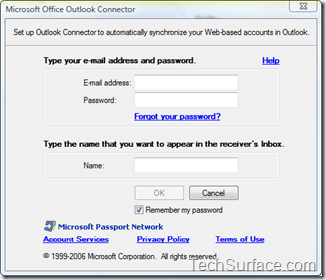
- Click OK
- Restart the Outlook, to take effect

