Read first : How to Create Movie Using Windows Live Movie Maker
Sharing or publishing Videos using Windows Live Movie Maker beta :

To make a sharable version of your movie, navigate to Home tab, in ‘Make a movie ‘ section , you will find two option :
One option is to output your movie as a video file that’s saved on your computer. Then you can watch your movie on your computer by playing it in a media player, such as in Windows Media Player.
- To Save Movie on your computer click on Output
- Then Enter the filename and click on save
Another option is for sharing your movie by publishing it on the web to Soapbox on MSN Video. After your movie is published on Soapbox, you can send friends and family an e-mail message with a link to the video.
- To publish your Movie Online, click on Publish under Home Tab
- Sign In with your Windows Live ID
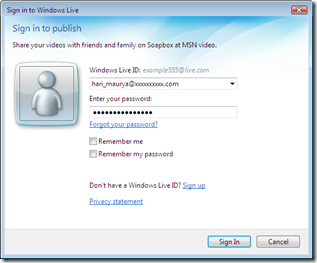
- After Sign In, Enter the Video Name, Description, tag, select category, and accept the policy, then click on Publish
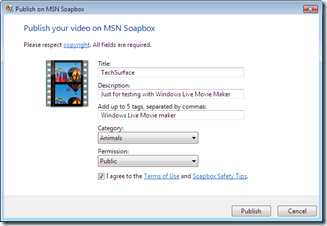
- This will save your movie on computer first after that it will start transcoding and publishing on Soapbox.
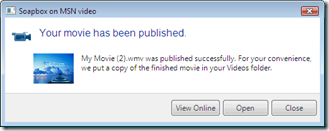
Click on ‘View Online’ to view your movie online or Click on Open to open the folder.


Pingback: Creating and sharing movie with Windows Live Movie Maker | Techsurface | Innovating Technology()