Everyone know, Windows Vista is resource hungry OS that require at least 512 MB of RAM to install. Here is a simple trick to install Windows Vista using less than 512 Mb of RAM that bypass the checking system requirements but I recommend to increase or upgrade your RAM to run Windows Vista simple, easier and faster.
1) Boot from Windows Vista DVD
2) Select your Regional settings and click on Next.
3) On the setup screen click on Repair your computer and proceed next to get System Recovery Options.
4) Here launch Command prompt and navigate to your DVD drive. Lets assume the DVD drive is D: and execute the following command to start installation.
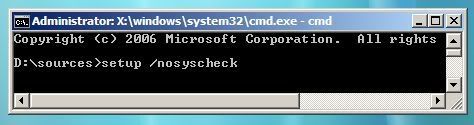
By executing this command setup skip checking phase of minimum system requirements and proceed next to accomplish the installation.
Source : Its My Windows

